Compare Routes
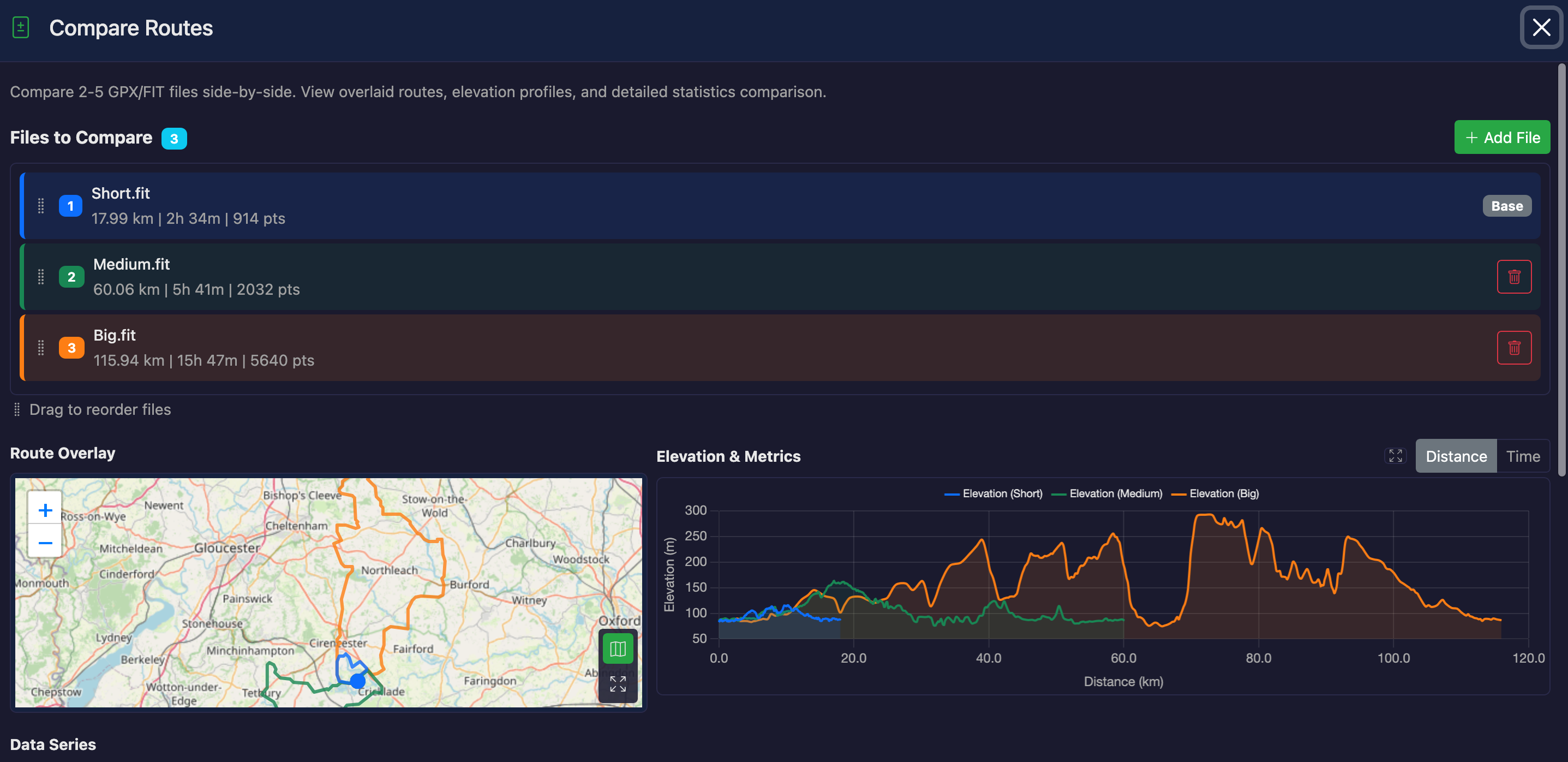
The Compare Routes tool allows you to compare 2-5 GPX or FIT files side-by-side. Overlay routes on a map, compare elevation profiles, and see detailed statistics comparisons.
How to Use
- Load a file in GPXFIT (this becomes File 1)
- Click the "Compare Routes" button
- Click "Add File" to upload a second file for comparison
- Optionally add more files (up to 5 total)
- View the overlaid routes, charts, and statistics
Features
Route Overlay
All routes are displayed overlaid on a single view with different colors:
- File 1 (Blue) - Your currently loaded file
- File 2 (Green) - First comparison file
- File 3 (Orange) - Optional
- File 4 (Purple) - Optional
- File 5 (Red) - Optional
Toggle between a canvas preview and an interactive Leaflet map using the map button. Start and end markers are shown for each route on the map.
Fullscreen
Both the route overlay and the elevation chart have fullscreen buttons. Click to expand for a detailed view, press Escape to exit.
Elevation Chart
Elevation profiles for all files are overlaid on a single chart, making it easy to compare terrain. You can toggle additional metrics:
- Elevation - Always displayed
- Speed - Optional overlay
- Heart Rate - Optional overlay (if data available)
- Power - Optional overlay (if data available)
- Cadence - Optional overlay (if data available)
- Temperature - Optional overlay (if data available)
X-Axis Options
- Distance - Compare based on distance traveled (default)
- Time - Compare based on elapsed time (requires timestamps in all files)
Statistics Comparison Table
A detailed table shows key metrics with difference columns:
- Distance - Total route distance
- Duration - Total time (if available)
- Ascent/Descent - Total climbing and descending
- Max/Min Elevation - Elevation extremes
- Average/Max Speed - Speed statistics
- Sensor Data - HR, Power, Cadence (if available)
Difference Columns
The table shows differences between File 1 and each other file (Diff 1-2, Diff 1-3, etc.).
Differences are color-coded: green for better values, red for worse (context-dependent).
Use Cases
Comparing Different Attempts
Compare multiple rides or runs on the same route to see how your performance has changed over time.
Route Planning
Compare different route options to choose the best one based on distance, elevation, or terrain.
Device Comparison
Compare recordings from different GPS devices to identify tracking differences.
Before/After Analysis
Compare an original file with a modified version to see the effects of edits.
Notes
- File 1 (the currently loaded file) cannot be removed
- Additional files can be added or removed as needed
- Drag to reorder files — colors and the base file update automatically
- Routes do not need to be identical - you can compare any files
- Metrics are only shown if data is available in the files
- The Time X-axis option is disabled if any file lacks timestamp data