Ghost Racer
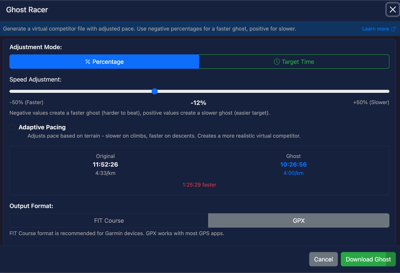
The Ghost Racer tool creates a virtual competitor from your route that you can race against on compatible GPS devices. Use it to challenge your past performance, train at a target pace, or simulate race scenarios.
When to Use
This tool is useful when:
- You want to race against your past self on a familiar route
- You need to train at a specific target pace or finish time
- You want to simulate racing conditions for an upcoming event
- You need a virtual pacer for interval training on a known route
How to Use
- Load a GPX or FIT file that contains timestamp data
- Click the Ghost Racer button to open the tool
- Choose your pacing mode:
- Adjust the slider or enter your target time
- Optionally enable Adaptive Pacing for terrain-adjusted effort
- Choose your output format (FIT Course or GPX)
- Click Download Ghost to save the file
Pacing Modes
Percentage Mode
Adjust the ghost's pace relative to the original activity:
- Slider range: -50% (faster) to +50% (slower)
- Negative values: Ghost completes the route faster than original
- Positive values: Ghost completes the route slower than original
For example, if your original ride took 2 hours:
- Setting -10% creates a ghost that finishes in 1 hour 48 minutes
- Setting +20% creates a ghost that finishes in 2 hours 24 minutes
Target Time Mode
Set a specific finish time for the ghost:
- Enter the time in HH:MM:SS format
- The ghost's pace is calculated to achieve exactly that finish time
- Useful when training for a specific race goal
For example, if you want to complete a 10km route in exactly 50 minutes, enter 00:50:00 and the ghost will maintain the required pace throughout.
Adaptive Pacing
When enabled, adaptive pacing creates a more realistic ghost that adjusts effort based on terrain:
- On climbs: Ghost slows down to reflect increased effort
- On descents: Ghost speeds up where gravity assists
- On flats: Ghost maintains target pace
Benefits:
- More realistic effort distribution matches how you actually ride or run
- Better pacing strategy for hilly routes
- Ghost behaviour feels more natural to race against
- Overall target time or percentage is still maintained
When to use:
- Hilly or mountainous routes
- Routes with significant elevation changes
- When you want pacing that matches real-world effort
When to skip:
- Flat routes where constant pace makes sense
- When you specifically want to practice even pacing regardless of terrain
Output Formats
FIT Course
The recommended format for most GPS devices:
- Best compatibility: Works with Garmin Virtual Partner feature
- Distance field included: Enables accurate gap calculations on device
- Native format: Garmin devices handle FIT files natively
GPX with Extensions
An alternative format with broader compatibility:
- Wider device support: Works with devices that don't support FIT
- Ghost timestamps: Contains time data for each point
- Target speeds: Includes calculated speed data in extensions
- Backup option: Useful if FIT files won't load on your device
Device Compatibility
Garmin Devices
| Device Series | Feature | Notes |
|---|---|---|
| Edge (cycling computers) | Virtual Partner | Full support with FIT Course files |
| Forerunner | Course Racing | Load as course, race against ghost |
| Fenix/Enduro | Course support | Virtual partner available |
| Instinct | Course support | Basic ghost racing |
Other Devices
| Device | Support |
|---|---|
| Wahoo ELEMNT | Course import with pace guidance |
| Hammerhead Karoo | Course support |
| Suunto | GPX course import |
| Coros | Route import |
Requirements
For the Ghost Racer tool to work, your file must have:
- Timestamp data: Each track point needs a recorded time
- Minimum 2 points with times: At least start and end times required
- Original duration > 0: The track must represent elapsed time
Files without timestamps (such as routes or planned courses) cannot be used to create ghost racers.
Tips
- Start conservatively: Begin with small adjustments (5-10%) to find a challenging but achievable pace
- Test before important workouts: Load the ghost file onto your device and verify it works correctly before relying on it for key training sessions
- Use adaptive mode for hills: On routes with significant climbing, adaptive pacing provides a more realistic and useful ghost
- Try GPX as backup: If a FIT file doesn't load correctly on your device, download the GPX version instead
- Consider segment length: Very short routes may not provide enough time for meaningful ghost racing
- Save your originals: Keep your original activity files so you can create new ghosts with different targets later
Troubleshooting
Ghost file won't load on device
- Ensure your device supports the file format (try GPX if FIT doesn't work)
- Check that the file was transferred to the correct folder on your device
- Verify the device firmware is up to date
Ghost pace seems wrong
- Confirm the original file had accurate timestamps
- Check that you selected the correct mode (percentage vs target time)
- Verify the time format is correct (HH:MM:SS) in target time mode
No Virtual Partner option on device
- Not all devices support Virtual Partner; check your device specifications
- Ensure the file is loaded as a Course, not just a track
- Some devices require enabling the feature in settings