Time Shift
The Time Shift tool lets you adjust all timestamps in your track by a specified offset. This is useful for correcting timezone errors or fixing a GPS device with an incorrect clock.
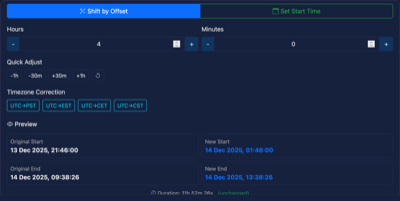
Features
Shift by Offset
Adjust all timestamps by a specific number of hours and/or minutes.
Controls:
- Hours (-23 to +23) - Use +/- buttons or enter a value directly
- Minutes (-59 to +59) - Use +/- buttons or enter a value directly
Quick Adjust buttons:
- -1h, -30m, +30m, +1h for common adjustments
- Reset button to return to zero offset
Timezone Correction presets:
- UTC to PST (-8h) - US Pacific
- UTC to EST (-5h) - US Eastern
- UTC to CET (+1h) - Central European
- UTC to CST (+8h) - China Standard
Set Start Time
Instead of specifying an offset, you can set the exact start time you want for your track. All other timestamps will shift proportionally.
How to use:
- Select "Set Start Time" mode
- Use the date/time picker to choose the desired start time
- The tool calculates the required offset automatically
This is useful when you know what time an activity actually started but your GPS recorded the wrong time.
Preview
The preview section shows:
- Original Start/End - The current timestamps in your track
- New Start/End - What the timestamps will become after shifting
- Duration - Shows the track duration (unchanged by time shifting)
When to Use
Timezone Correction
Your GPS device may record timestamps in UTC or a different timezone than where you were. Common scenarios:- GPS recorded in UTC, you want local time
- Device set to wrong timezone for a trip abroad
- Syncing tracks from devices in different timezones
Wrong GPS Clock
Some GPS devices lose their time setting when the battery dies or is removed. The device may:- Default to an incorrect date (often 1970 or 2000)
- Be off by hours due to a missed sync
Combining Tracks
When merging tracks from different sources, timestamps may need adjustment to align properly.How It Works
- All track points with timestamps are shifted by the same offset
- Route points (if present) are also shifted
- The relative timing between points is preserved
- Track duration remains unchanged
Notes
- The tool requires your track to have timestamp data
- If no time data exists, the Time Shift button will be disabled
- Changes can be undone using the undo feature
- Timestamps are stored in ISO 8601 format (UTC)
- The preview shows local time for readability