View Raw
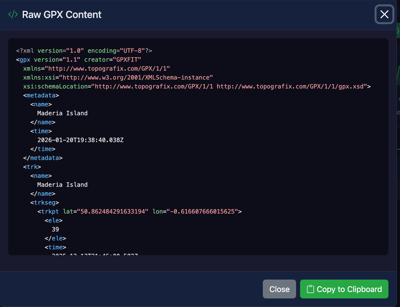
The View Raw tool displays the original XML source code of your GPX file, allowing you to inspect the underlying data structure.
What is GPX?
GPX (GPS Exchange Format) is an XML-based file format used for storing GPS data such as waypoints, tracks, and routes. When you upload a GPX file to GPXFIT, the raw XML is parsed to extract the route information.
How to Use
- Upload a GPX file using the file upload area
- Click the View Raw button in the Tools section
- A modal window will display the complete XML content
- Use the Copy to Clipboard button to copy the content
What You'll See
The raw view shows the complete GPX XML structure, including:
- Metadata: File name, description, author information
- Waypoints: Individual points of interest with coordinates
- Tracks: The recorded route with all trackpoints
- Extensions: Additional data like heart rate, cadence, or temperature
Tips
Use the raw view to verify your GPX file contains the expected data before applying any transformations.
Example GPX Structure
<?xml version="1.0" encoding="UTF-8"?>
<gpx version="1.1" creator="GPXFIT">
  <metadata>
    <name>My Route</name>
  </metadata>
  <trk>
    <name>Track 1</name>
    <trkseg>
      <trkpt lat="51.5074" lon="-0.1278">
        <ele>11</ele>
        <time>2024-01-01T10:00:00Z</time>
      </trkpt>
      <!-- More trackpoints... -->
    </trkseg>
  </trk>
</gpx>