
help What is PLC Tracker?
Schools provide Personal Learning Checklists (PLCs) - topic lists showing everything students need to know for their exams. These are often handed out as PDFs or Word documents that quickly get lost or forgotten. PLC Tracker brings these checklists into a web app where students can actively track their progress and parents can easily see how revision is going.
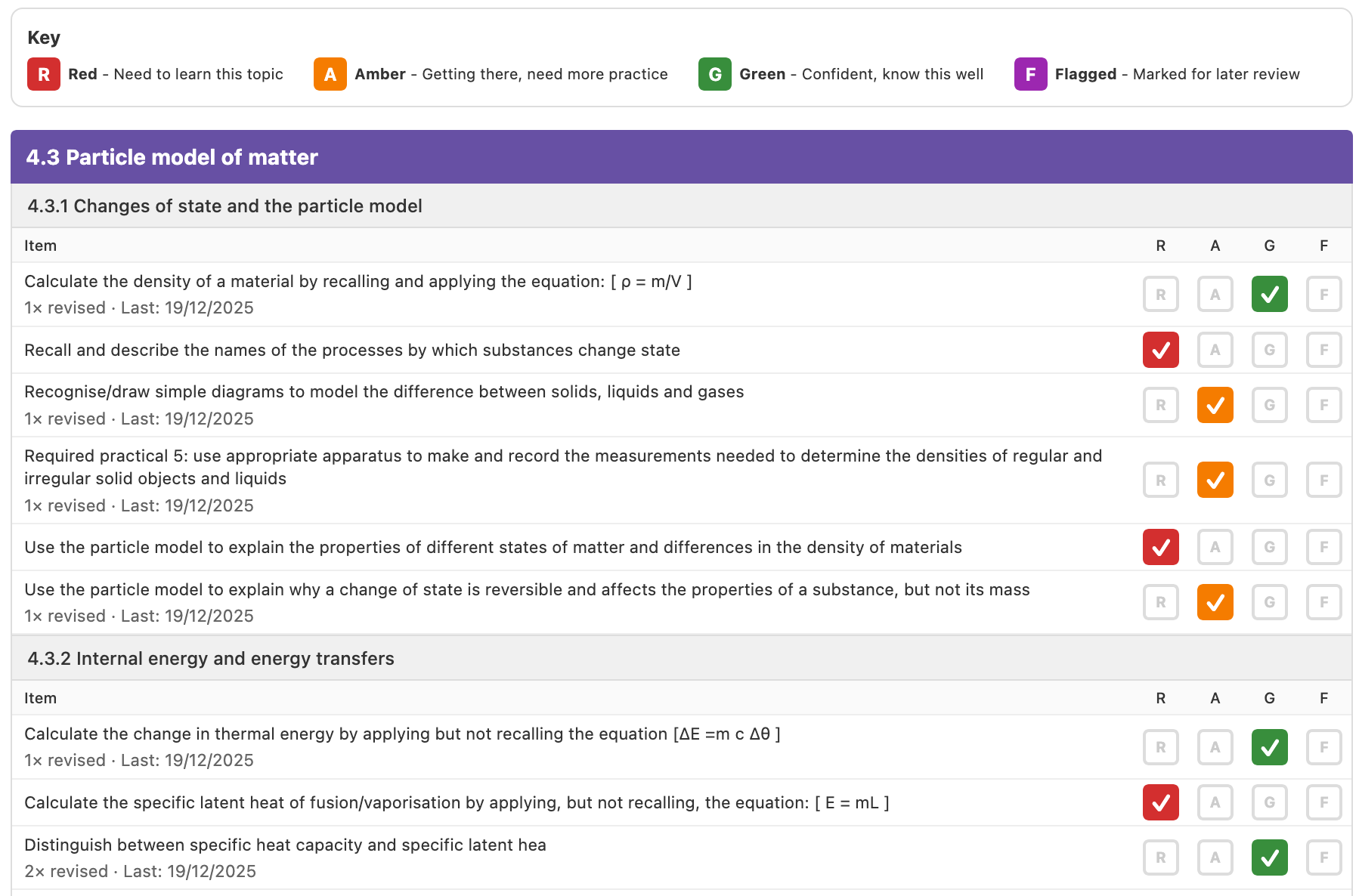
Students rate their confidence on each topic using a simple Red-Amber-Green (RAG) system. This makes it easy to see at a glance which areas need the most attention, helping to focus revision time on weaker topics rather than repeatedly going over material they already know.
For students using Anki flashcards, PLC Tracker can link each topic to an Anki deck. This means they can create flashcards directly from PLC items - one card per topic helps organise revision and ensures nothing gets missed.
palette Understanding the RAG System
Your child will rate each topic using three colours:
Red - Need to Learn
"I don't know this yet"
Amber - Getting There
"I sort of know this but need more practice"
Green - Confident
"I know this well and could answer exam questions"
lightbulb Parent Tip
Lots of red at the start is completely normal and good! It shows your child is being honest about what they need to learn. The goal is to watch those reds turn green over time.
rocket_launch How Your Child Gets Started
1 Import or Choose PLCs
Your child can import their school's PLC spreadsheet, or use one of the built-in PLCs we provide for common GCSE subjects (AQA, OCR).
2 Complete the First Run
They'll go through each topic once and rate their initial confidence. This takes about 10-15 minutes per subject and creates their baseline.
3 Revise and Update
As they study, they update their RAG ratings. The app shows which topics need attention and tracks progress over time.
calendar_month Suggested Timetable
Here's our recommended timeline for getting the most out of PLC Tracker across the two-year GCSE course:
Use the Christmas holidays to import your school's PLCs. After one term of GCSEs, students have a rough understanding of each subject.
Complete the First Run for each subject by February half term. Then start creating Anki cards as topics are taught - while the material is fresh.
Continue building Anki cards and updating RAG ratings. Mock exams are approaching - there's plenty of time to keep strengthening weak areas.
Use Anki cards for focused revision. Add more detail to cards where needed. The PLC dashboard helps identify priority topics.
After mocks, review the PLCs based on exam experience. Update RAG ratings - some may go up, some down. This creates a solid foundation.
Second mocks or final exam prep. With accurate RAG ratings and well-built Anki decks, revision is targeted and effective.
| Year 10 | Dec | Jan | Feb | Mar | Apr | May | Jun | Jul | Aug | |
|---|---|---|---|---|---|---|---|---|---|---|
| Setup & Import | First Runs | Create Anki Cards | Summer Break (revise too!) | |||||||
| Year 11 | Sep | Oct | Nov | Dec | Jan | Feb | Mar | Apr | May | Jun |
|---|---|---|---|---|---|---|---|---|---|---|
| Build & Prepare | Mock Exams | Review & Refine | Final Revision & Exams | |||||||
lightbulb Don't Worry About Being Late
Starting later than December Year 10? No problem! The key is getting PLCs loaded and First Runs done as soon as possible. Even starting in Year 11 still gives students a valuable tool for organising their revision.
visibility How to Check Progress
You can easily see how revision is going:
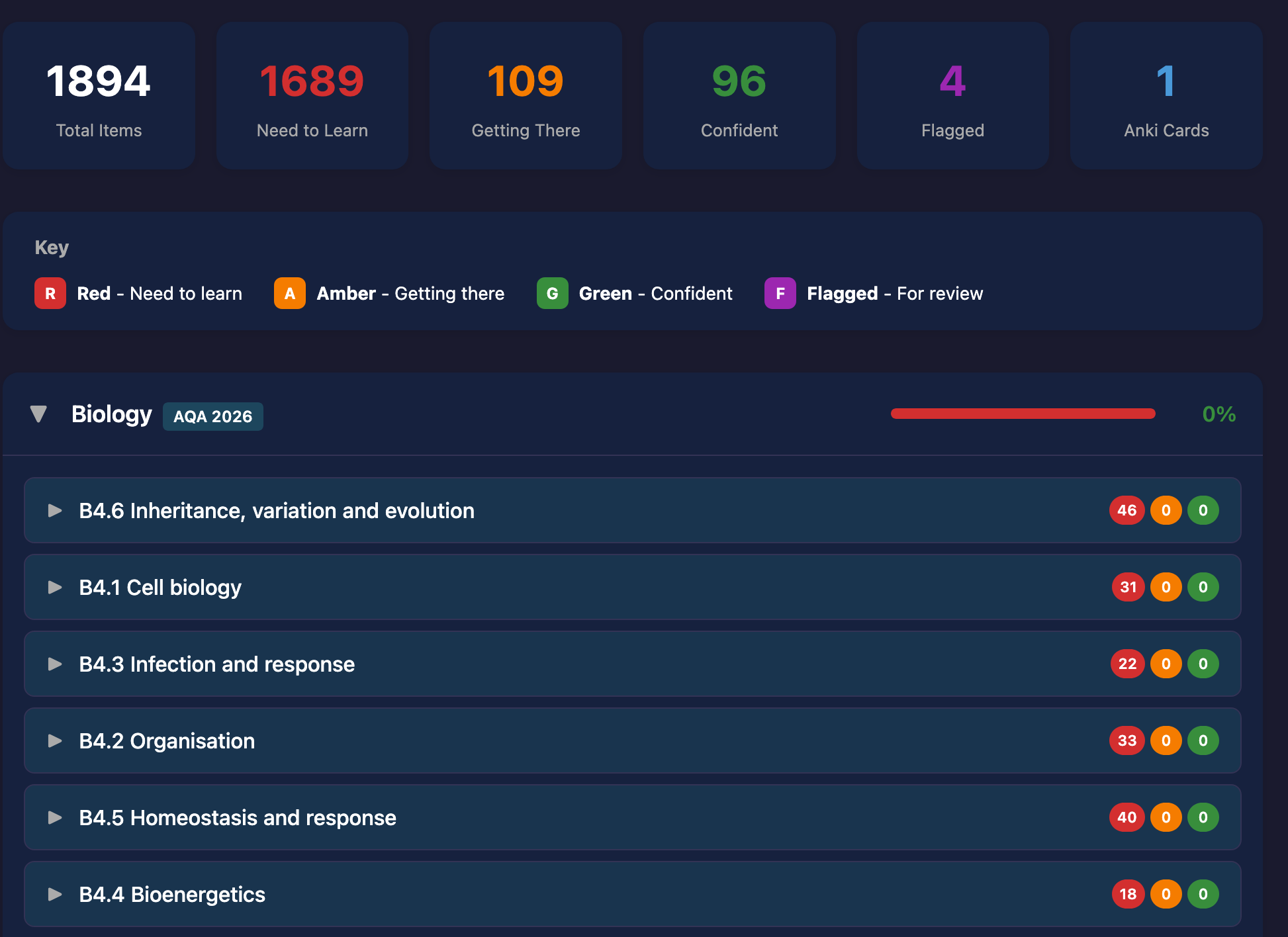
- Dashboard cards show RAG percentages for each subject
- Progress charts show improvement over time
- Focus Areas highlight subjects and topics that need attention
- Printable reports can be generated to review or share with tutors
Click any image to view larger:

tips_and_updates Optional Features
style Anki Integration
If your child uses Anki flashcards, they can link their decks and create flashcards directly from PLC items while revising.
cloud Google Drive Backup
Progress can be backed up to Google Drive, allowing access from different devices and preventing data loss.
security Privacy & Data
- All data is stored locally on the device by default
- No account required to use the app
- Google Drive backup is optional and controlled by the user
- We don't collect or share any personal information
support Supporting Your Child
Encourage honesty - remind them that red ratings aren't "bad", they're helpful for identifying where to focus.
Celebrate progress - when reds turn to ambers and ambers turn to greens, that's real learning happening!
Check in regularly - a quick look at the dashboard together can spark useful conversations about revision.
volunteer_activism How This Site is Funded
PLC Tracker is a personal project that I maintain in my spare time. I believe revision tools should be accessible to all students, regardless of their family's financial situation.
- No adverts - I don't want students distracted by ads while revising
- No subscription fees - I don't think it's right to charge monthly for a study tool
- No one-off purchase - I want this to be available to everyone
- Donations only - If you find it useful and want to support development, you can
If PLC Tracker helps your child with their revision and you'd like to support its continued development, you can send a tip using the donate button in the corner of this page. There's absolutely no obligation.